| |
<%
Dim enable_trace
if request.QueryString("trace") = "yes" then
enable_trace = true
else
enable_trace = false
end if
Sub SendEmail (xfrom,xto,xsubject,xtext)
Set myMail=CreateObject("CDO.Message")
set cdoConfig = CreateObject("CDO.Configuration")
cdoConfig.Fields("http://schemas.microsoft.com/cdo/configuration/sendusing") = 2
'cdoConfig.Fields("http://schemas.microsoft.com/cdo/configuration/smtpserver") = "smtp.gmail.com"
cdoConfig.Fields("http://schemas.microsoft.com/cdo/configuration/smtpserver") = "relay-hosting.secureserver.net"
cdoConfig.Fields ("http://schemas.microsoft.com/cdo/configuration/smtpserverport") = 25
cdoConfig.Fields ("http://schemas.microsoft.com/cdo/configuration/smtpusessl") = False
cdoConfig.Fields ("http://schemas.microsoft.com/cdo/configuration/smtpconnectiontimeout") = 30
'cdoConfig.Fields ("http://schemas.microsoft.com/cdo/configuration/smtpauthenticate") = 1 'basic (clear-text) authentication
'cdoConfig.Fields ("http://schemas.microsoft.com/cdo/configuration/sendusername") ="web@prozakandtheplatypus.com"
'cdoConfig.Fields ("http://schemas.microsoft.com/cdo/configuration/sendpassword") ="web4platy"
cdoConfig.Fields.Update
myMail.Configuration = cdoConfig
myMail.Subject=xsubject
myMail.From=xfrom
myMail.To=xto
myMail.TextBody=xtext
myMail.Send
set myMail=nothing
set cdoConfig=nothing
end sub
sub trace (msg)
if enable_trace then
SendEmail "web@prozakandtheplatypus.com","tony@bosauto.com","test script trace",msg
end if
end sub
dim LoggedInWithCookie
LoggedInWithCookie = false
trace "initial session info: id = " & Session("LoginID") & "; password = " & Session("loginPassword")
If (Session("LoginID") = "") or (Session("LoginPassword") = "") then
Session("LoginID") = Request.Cookies("PlatyCredentials")("ID")
Session("LoginPassword") = Request.Cookies("PlatyCredentials")("Password")
LoggedInWithCookie = true
trace "no password in session. After cookie check, id = " & Session("LoginID") & "; password = " & Session("LoginPassword")
end if
Dim LoginRecord__ID
LoginRecord__ID = "-1"
If (Session("LoginID") <> "") Then
LoginRecord__ID = Session("LoginID")
End If
Dim LoginRecord__PW
LoginRecord__PW = "zzz"
If (Session("LoginPassword") <> "") Then
LoginRecord__PW = Session("LoginPassword")
End If
Dim LoginRecord
Dim LoginRecord_cmd
Dim LoginRecord_numRows
Set LoginRecord_cmd = Server.CreateObject ("ADODB.Command")
LoginRecord_cmd.ActiveConnection = MM_PlatyDB_STRING
LoginRecord_cmd.CommandText = "SELECT * FROM Members WHERE ID = ? AND MemberPassword = ?"
LoginRecord_cmd.Prepared = true
LoginRecord_cmd.Parameters.Append LoginRecord_cmd.CreateParameter("param1", 5, 1, -1, LoginRecord__ID) ' adDouble
LoginRecord_cmd.Parameters.Append LoginRecord_cmd.CreateParameter("param2", 200, 1, 255, LoginRecord__PW) ' adVarChar
Set LoginRecord = LoginRecord_cmd.Execute
LoginRecord_numRows = 0
Logged__In = False
if not LoginRecord.eof then
if LoginRecord("MemberPassword") = Session("LoginPassword") then
Logged__In = True
Logged__InName = LoginRecord("MemberUsername")
end if
end if
LoginRecord.Close()
Set LoginRecord = Nothing
%>
"> " width="112" height="57" border="0" /> " width="112" height="57" border="0" />
<% if logged__in then %>G'day, <%=Logged__InName%>!
[log out|profile]<% end if%> |
|
|
|
|
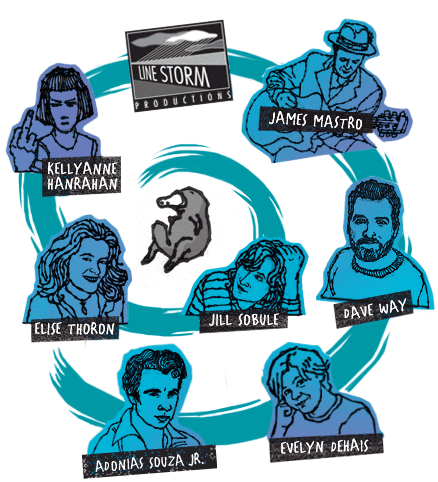
Prozak and the Platypus is a multifaceted collaboration between playwright Elise Thoron, singer-songwriter Jill Sobule and art girl KellyAnne Hanrahan which includes a musical play, an album length CD, a comic and a website. The musical play was first staged at the Beckett Theater as part of the first Summer Play Festival (SPF 2004) in New York. It was then presented at Hartford Stage's Brand:New Festival (2006) and has been used in the curriculum for high school and college students at NYSSSA (New York State Summer School for the Arts) and Baruch College. Click below to learn more about the players - be sure to come back and watch the spiral grow! And click on the platy (in the middle) to find out how you can become part of the swirl…
|
::::::::::::::::::::::::::::::::::::::::::::::::::::::::::::::::::::::::::::::::::
Put our bouncing platy banner on your website or blog or
send them in
e-mails to your friends!

Here's how on a PC:
1. Right click with your mouse on the banner above.
2. A pop-up menu will appear: select "save image as".
3. Give it a name.
4. Save the file wherever you like on your computer.
Here's how on a Mac:
1. Click and hold your mouse on the banner above.
2. A pop-up menu will appear: select "save image as".
3. Give it a name.
4. Save the file wherever you like on your computer.
Just remember to link them to
www.prozakandtheplatypus.com!
the story : the music : get the goods : stage the play : dive deeper : become us : home : contact us : guestbook
|
|